


Mini Challenges: Calm Games
4.8338.00 Reviews
App Specs
- Version
- 1.0.35
- Updated On
- License
- Free
- Downloads
- 10,000,000+
- Developer
- UltraPub
- Categories
- Casual
- Platform
- Android
Screenshots




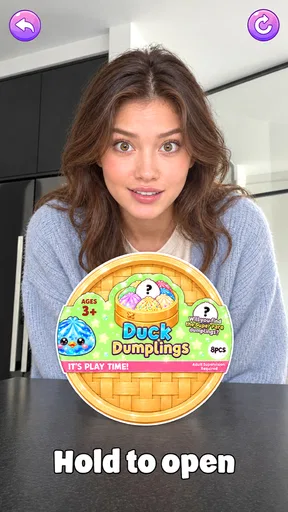



 Analysis by AppCompare
When I have a few minutes to fill, I usually want a game that lets me begin right away rather than asking me to learn a complicated system. Mini Challenges: Calm Games suits that mood: it brings small, low-pressure activities together in one casual game. I’d reach for it on a short break, during a quiet commute, or whenever I want to focus on something simple without turning the moment into a test of skill.
How the Small Challenges Hold Up
The game comes from UltraPub and is free to play. Its average rating is 4.8 from around 43,000 ratings, and it has passed 5 million installs. Those figures suggest that its straightforward appeal reaches a broad audience, though they don’t tell me whether its particular style will suit every player. It is rated Everyone, and the current version is 1.0.16. I’d think of it as a casual time-filler, not a deep puzzle game or a structured relaxation program.
Getting Started Without a Long Warm-Up
The first thing that caught my attention was the interface. It’s clean, intuitive, and just feels cozy. Navigating through the games is a breeze. I didn’t have to spend ages figuring out where things were. Everything is laid out clearly, making it easy to jump from one game to another. Plus, the calming colors and graphics are easy on the eyes, which is a huge plus when you’re trying to unwind.
That immediate access matters more than it may sound. With a collection of short activities, the useful choice is often not “Which game will I master?” but “What kind of small task feels right right now?” A puzzle can suit a moment when I want to concentrate, while a memory challenge asks me to pay attention in a different way. I’d sample a couple of options before settling on a favorite; the variety is most valuable when I match the activity to my energy rather than playing every mini-game in the same way.
Another neat feature is the seamless load time. You know how some apps make you wait forever to get started? Not this one. You tap, and boom, you’re in. It’s perfect for those quick breaks during the day when you need to recharge.
What the Challenges Ask of You
Let’s talk about the games themselves. They’re simple yet engaging. There’s a little bit of everything to suit different moods. Feeling like a quick brain teaser? There’s a puzzle game for that. Want to test your memory? Check out the memory challenges. Each game is designed to be low-pressure, so you’re not left feeling frustrated or overwhelmed.
The early goal is refreshingly modest: choose an activity and get into it. There’s no need to set aside a long session or prepare for a complicated campaign. That makes the game a sensible pick for someone who wants an occasional mental reset, and also for a younger or less experienced player who may prefer approachable tasks. I would not choose it, though, if I wanted one intricate puzzle with a carefully explained solution or a demanding challenge that rewards long practice.
Worth Reading Before You Choose

Switching to Android Auto Means Rethinking Your Driving Routine

Google Calendar Makes a Crowded Week Easier to Manage

Baby Panda World Brings Quick Play to Modern Phones, but Its Game Library Feels Busy

ESPN’s Live Game View Makes Following Close Games Easier

QuizzLand Review: A Good Fit for Short Trivia Breaks, Not Every Player

Basketball Stars: Multiplayer Is Fast, but Can It Recover When Matches Go Wrong?
What I love is how these games manage to balance being easy to pick up, yet still offering enough depth to keep you coming back. It’s like having a little variety show in your pocket. There’s always something new to try, and the developers keep adding fresh content, which is a nice touch.
Progress Without a Heavy Commitment
In this kind of game, progress does not have to mean a long ladder of levels. I get more value from noticing which activities suit me and returning to them when I want a different kind of focus. The mini-game format itself provides a useful signal: I can switch from a puzzle to a memory task instead of forcing myself through one mode when I’ve lost interest. That choice helps the collection feel flexible, even if it is not the same as building a character or chasing a major campaign milestone.
A practical tip is to treat each visit as a small session with a purpose. If I have only a brief pause, I can pick one challenge and stop when the break is over; if I have longer, I can explore another activity. This keeps the app from becoming an unplanned time sink and makes its variety work for me. Players who need unlocks, rankings, or a clear long-term target to stay motivated may find this lighter sense of progress less satisfying.
A Good Fit for Everyday Pauses
If you’re someone who’s always on the move, this app is a gem. It works smoothly on both Android and iOS, so you’re covered no matter your device. The offline mode is a lifesaver, especially if you find yourself without internet. You can still enjoy all your favorite games without a hitch.
That makes a useful everyday scenario easy to picture: I’m waiting for an appointment, my connection is unreliable, and I want something more engaging than scrolling through the same feed. A short puzzle or memory activity gives me a specific thing to attend to, then lets me put the phone away when I’m called. It is also the sort of game I’d keep in mind for a quiet moment at home when I want a small diversion rather than a show or a lengthy game session.
Plus, the app doesn’t hog your phone’s resources. It’s lightweight, and I haven’t noticed any battery drain or lag issues. It’s refreshing to use an app that doesn’t make my phone feel like it’s about to take off.
Compared with the usual alternatives, this sits between a single-purpose puzzle app and a broad collection of more demanding mobile games. A dedicated puzzle game may be better if you want a consistent style and progressively harder problems; a more competitive title is the stronger choice if you want scores, pressure, or a multiplayer goal. Here, the trade-off is breadth and approachability rather than a deep focus on one mechanic. I’d pick it when I want to browse among simple activities, not when I’m looking for a carefully measured skill curve.
Calm Details and Their Limits
One of the standout features, in my opinion, is the gentle background music. It’s soothing and adds to the overall calming vibe of the app. You can totally zone out, focus on the game, and forget about the world for a bit. It’s these little touches that make Mini Challenges: Calm Games more than just another gaming app.
And if music isn’t your thing, you can easily mute it and play in silence. It’s all about personal preference, after all.
That option is worth using deliberately: in a shared room, on public transport, or during a quiet break, muting the sound lets the activity fit the setting instead of drawing attention to it. The low-pressure presentation is a strength, but it also sets expectations. Anyone hoping for a detailed story, a strong competitive loop, or a single puzzle mechanic with substantial depth should look elsewhere. Calm presentation does not automatically make every session restful, either; if I’m tired of tapping through small tasks, I’d rather close the game than keep searching for a perfect distraction.
Who Should Keep It Nearby
For me, the best audience is someone who likes bite-sized puzzles, wants a choice of simple activities, and values being able to start without a big learning curve. It can also work well as a casual family-friendly option, given its Everyone rating, though I’d still choose activities based on the player’s age and preferences. If you need a substantial progression system or want a game that demands sustained attention, this is probably not the right match.
It was released on January 22, 2026, and its minimum OS requirement is Android 7.0. I’d check that requirement against an older Android device before installing. More broadly, the key question is what you want from a casual game: if the answer is quick variety and an easy way to fill small gaps in the day, this is a reasonable one to try; if you want a specific promise such as competitive play or a long campaign, choose a game built around that instead.
My Take on Its Staying Power
In a world where everything seems to be go, go, go, finding something that lets you slow down and relax is a treasure. Mini Challenges: Calm Games is just that—an oasis of calm in your hectic day. Whether you’re a casual gamer or someone looking for a way to unwind, this app has something for you.
Its strongest reason to return is the convenience of having different small challenges ready when your mood changes. I don’t see that as a substitute for ambitious progression or a guarantee that every activity will stay fresh indefinitely. I see it as a practical little collection for pauses: easy to approach, easy to leave, and most enjoyable when I keep my expectations in line with its modest scope.
So, if you’re in the market for some digital zen, give it a try. It’s free to download, and you might just find yourself hooked on its simplistic charm. Happy gaming!
Pros
- Engaging mini-games enhance focus.
- Visually soothing with calm graphics.
- Daily challenges keep users motivated.
- Easy to navigate user interface.
- Light on battery and storage usage.
Cons
- Limited game variety after extended use.
- No multiplayer or social features.
- Ads can be frequent without premium.
- Lacks advanced customization options.
- Requires internet for some features.
FAQs for Mini Challenges: Calm Games
What is Mini Challenges: Calm Games and how does it work?
Mini Challenges: Calm Games is a collection of soothing mini-games designed to help users relax and unwind. The app features a variety of simple yet engaging puzzles and activities that promote mindfulness and stress relief. It's easy to navigate, with intuitive controls and a user-friendly interface, making it suitable for all ages.
Are there in-app purchases in Mini Challenges: Calm Games?
Yes, Mini Challenges: Calm Games offers in-app purchases. While the app provides a range of free content, some advanced features, additional mini-games, or customization options might require a purchase. These purchases are optional and meant to enhance the overall gaming experience without hindering access to the basic features.
Is an internet connection required to play Mini Challenges: Calm Games?
No, an internet connection is not required to play Mini Challenges: Calm Games. The app is designed to be accessible offline, allowing users to enjoy its calming activities anytime, anywhere. However, an internet connection may be needed for downloading updates or accessing certain online features.
How does Mini Challenges: Calm Games ensure user privacy and data security?
Mini Challenges: Calm Games takes user privacy and data security seriously. The app adheres to strict privacy policies, ensuring that personal data is not shared with third parties without consent. It uses encryption to protect data and complies with industry standards to safeguard user information.
Can children use Mini Challenges: Calm Games safely?
Absolutely, Mini Challenges: Calm Games is designed to be family-friendly, making it safe for children to use. The app includes content suitable for younger audiences, with no violent or inappropriate material. Parents can feel confident allowing their children to engage with its calming and educational mini-games.


